About Mural: Grids for Instagram
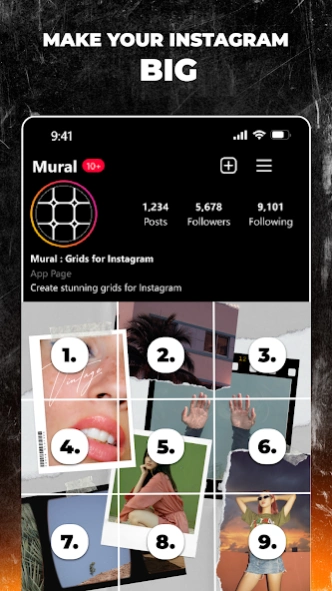
Mural is a grid image crop for Instagram feed. Mural offers photo grid editor & pic collage maker to make your post stand out. In Mural, Create giant panorama grid pic with mural using white border on canvas, resizing...
Mural is a grid image crop for Instagram feed.
Mural offers photo grid editor & pic collage maker to make your post stand out.
In Mural, Create giant panorama grid pic with mural using white border on canvas, resizing image for instagram feed, or image crop.
Add panorama photo to white border canvas, the app will crop your grid in to 9square & save to device, ready to post on instagram feed.
The best part of this panorama & photo grid editing app is its customizable, free, easy to use & has many template in-built.
By photosplit into a number of HD panorama square image, that's a 9square cropped photo grid pic collage.
Your grid can also be posted as giant feed layout using the mural app.
Magic Feed Layout in Mural
A unique feature that lets the app create photo grid & pic collage automatically for instagram feed! Just upload image to white border canvas & that's it!
Customized panorama crop ready with grid layout for Instagram feed. Insta feed post ready in just seconds after easy panorama crop!
Create your own style using a new Photo grid collage maker & layout for Instagram feed. If you want to cut an image into 3x1, 3x2, 3x3, 2x3, 2x2, 2x1, etc. for grid feed & share them to Instagram feed, use the 9 square grid layout Mural app & create your pic collage today!
Features of the Mural App:
👉 Trending feed template, pic collage & photo grid crop & panorama crop template
👉 Image resizing for instagram feed, alignment, rulers, layers, and background editing on canvas
👉 panorama crop & grid crop
👉 Square Image Maker white border for feed & pic collage to fit social media aspect ratio
👉 Panorama Crop Style with Stickers, Text styles, Layers
Mural Benefits:
💠 Create instant grid crop on white border using panorama crop in Mural app
💠 Panorama split for grid feed using in-built layout maker
💠 Corner Templates for Instagram grid post & feed layout
💠 Layout for panorama feed breakers
💠 Layout for panorama theme split on instagram feed in mural
💠 Photography collage for instagram layout using panorama crop using mural white border canvas
💠 Launch products on instagram feed using white border templates & stand out to your following
💠 Photo grid for instagram feed in minutes using customizable grid builder 💠 White border templates to stand out on instagram feed using panorama crop
💠 Startups & brands who wants to be on the top with their content can use this photo grid & pic collage
💠 Photographers who love aesthetic touch to their Photography can have this Pic collage maker & panorama crop
Best uses of Mural Photo Grid & Pic collage app with crop image:
🔰 Create a giant grid for instagram feed with photo grid
🔰 Panorama crop lets you display your photos on white border canvas
🔰 Crop image into a number of square image & upload to instagram feed
🔰AI photo editor & Image editor with collage builder to crop pictures online
🔰 Create scroll posts for Instagram feed to enhance the aesthetics of your feed
🔰 Show the entire profile picture on social media with the square image maker & No crop online photo editor
🔰 Have swipe post Insta for panorama image with this free photo collage builder using white border canvas
🔰 It’s a Pic collage app free to use as panorama image editor
🔰 Make a 9 square grid or IG foto grid post by splitting a photo
🔰 Develop Swipeable Panorama for Instagram
🔰 Make a perfect square picture & Instagram grid template, make a 9 cut
🔰 Instagram Post templates with photo grid on white border using this image split app
🔰 Swipe it! as Instagram photo editor, Instagram post creator & story maker for Instagram
🔰 Pic collage maker with wide range of layouts & custom edit options, Create stylish collage photos.
🔰 Crop image in equal parts to post in mural to create your unique instagram feed with this white border easy crop & arranging panorama crop in a grid.
Get this App with fully customizable & good photo grid templates &
Panorama crop
Previous Versions
Here you can find the changelog of Mural: Grids for Instagram since it was posted on our website on 2024-04-30 13:25:33.
The latest version is 1.2.4 and it was updated on 2026-10-10 13:26:55. See below the changes in each version.
Mural: Grids for Instagram version 1.2.4
Updated At: 2026-05-09
Changes: • Improvements to onboarding
• Fixed bug that was duplicating project
• Performance improvements
Mural: Grids for Instagram version 1.2
Updated At: 2024-10-28
Changes: - Bug fixes and performance improvements
- Create seamless carousel, story and pos
Mural: Grids for Instagram version 1.0.20
Updated At: 2024-03-27
Changes: • Introducing new corner templates for Instagram grids
• bug fixes and performance improvements